Free for Mac
Everything your agent makes. One beautiful place.
AI agents like Claude Code and Codex make pictures, videos, voiceovers and documents all day. AgentReel gives every one of them a home outside your code, shows them to you the second they’re saved, and keeps them organized. No more digging through folders to find what your agent made.
Free and open sourceSigned and notarized by AppleApple silicon, macOS 15 or later


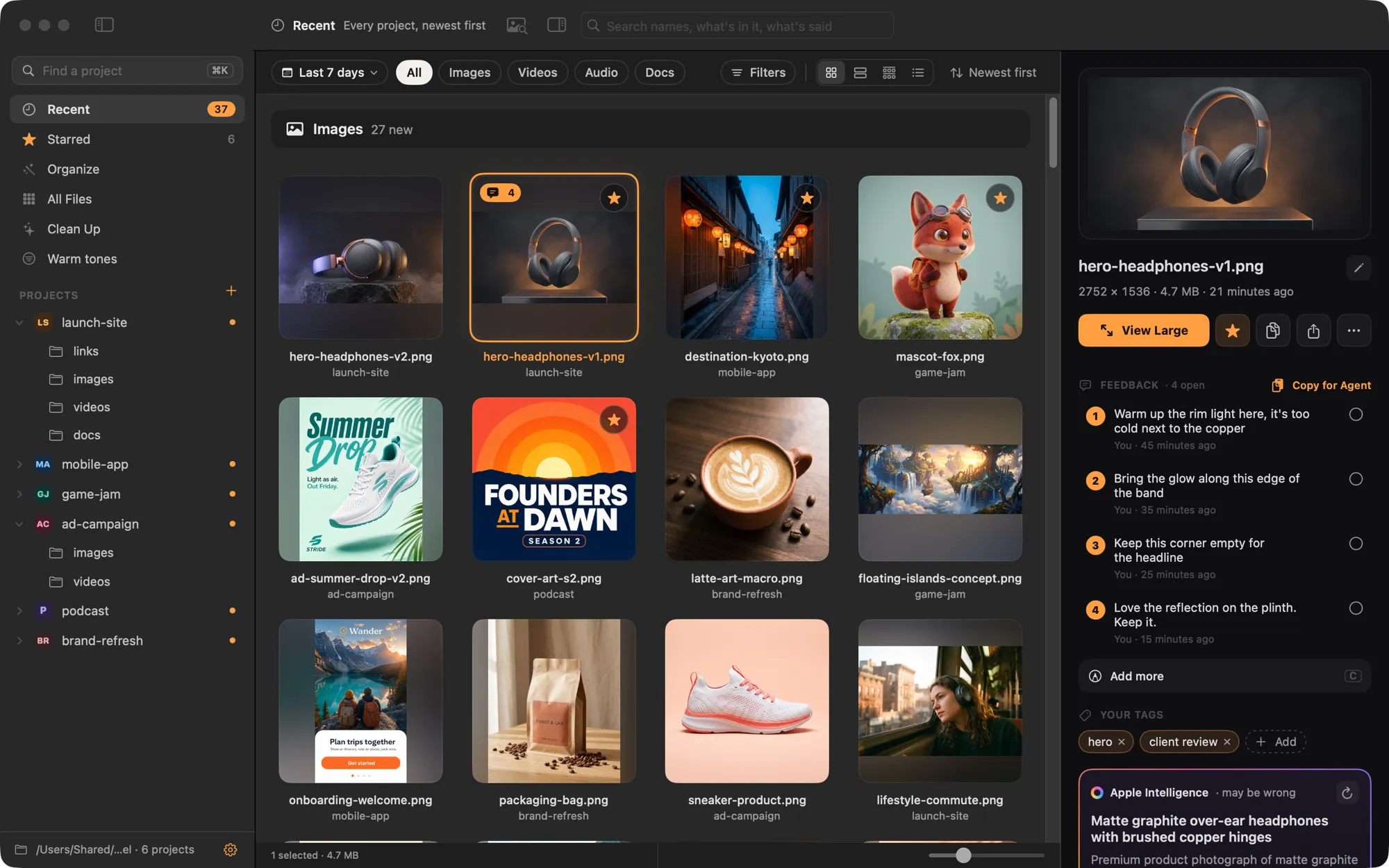


Pictures, videos, voiceovers, documents and links. Whatever your agents make, it lands here.















Every picture and clip on this page was made by an agent, and every screenshot is the real app.
The problem
“Wait, where did it save that?”
You ask your agent for a promo video. It says “done.” Then you spend five minutes in the terminal hunting for the file, scrolling past folders of code, opening things one at a time just to see what they are.
Meanwhile, renders, screenshots and test files pile up inside your project, where they don’t belong.
How it works
Set it up once. Then just watch.
You don’t need to learn any commands. Your agent handles that part.
- 1
Download and open it
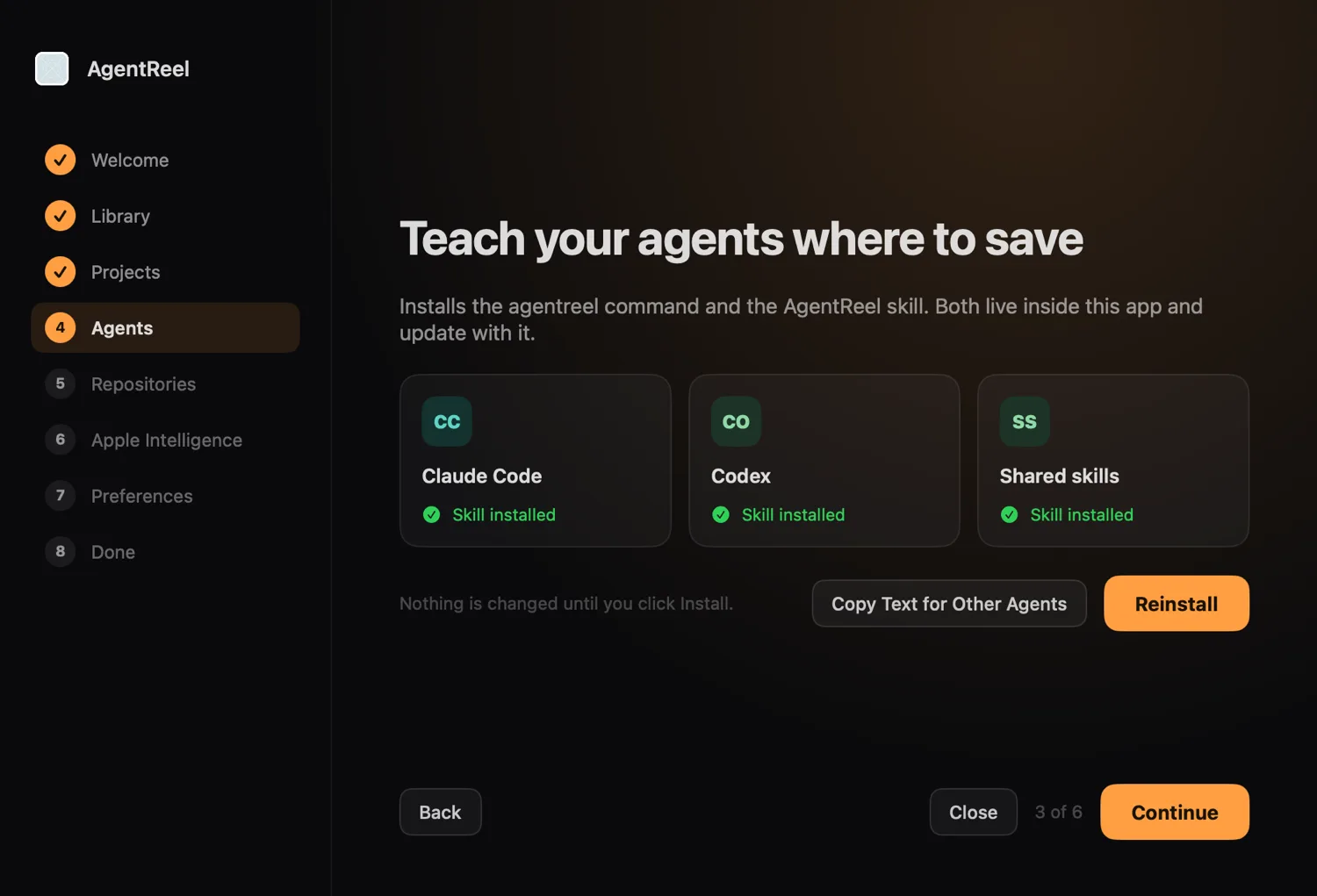
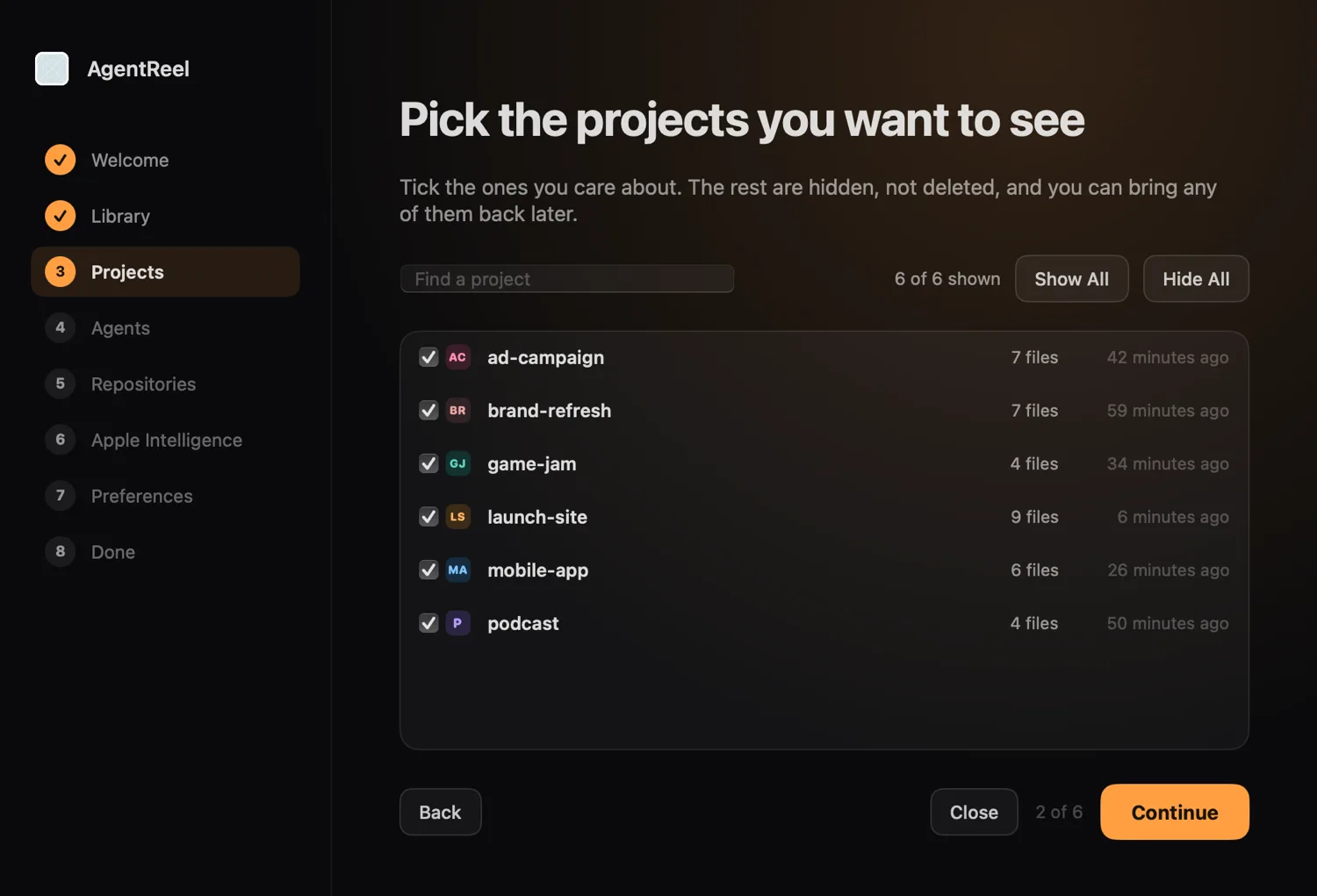
Drag AgentReel into Applications. The welcome screen sets everything up, teaches your agents where to save, and lets you pick which projects to show.
- 2
Ask your agent for anything
A logo, a launch video, a voiceover, a report. It saves the result into a folder for that project, never inside your code.
# your agent, behind the scenesagentreel dir videos~/AgentReel/launch-site/videosagentreel note launch-film.mp4agentreel reveal launch-film.mp4 - 3
Watch it land
New files show up in AgentReel within a second. Play them, star the good ones, and move on.
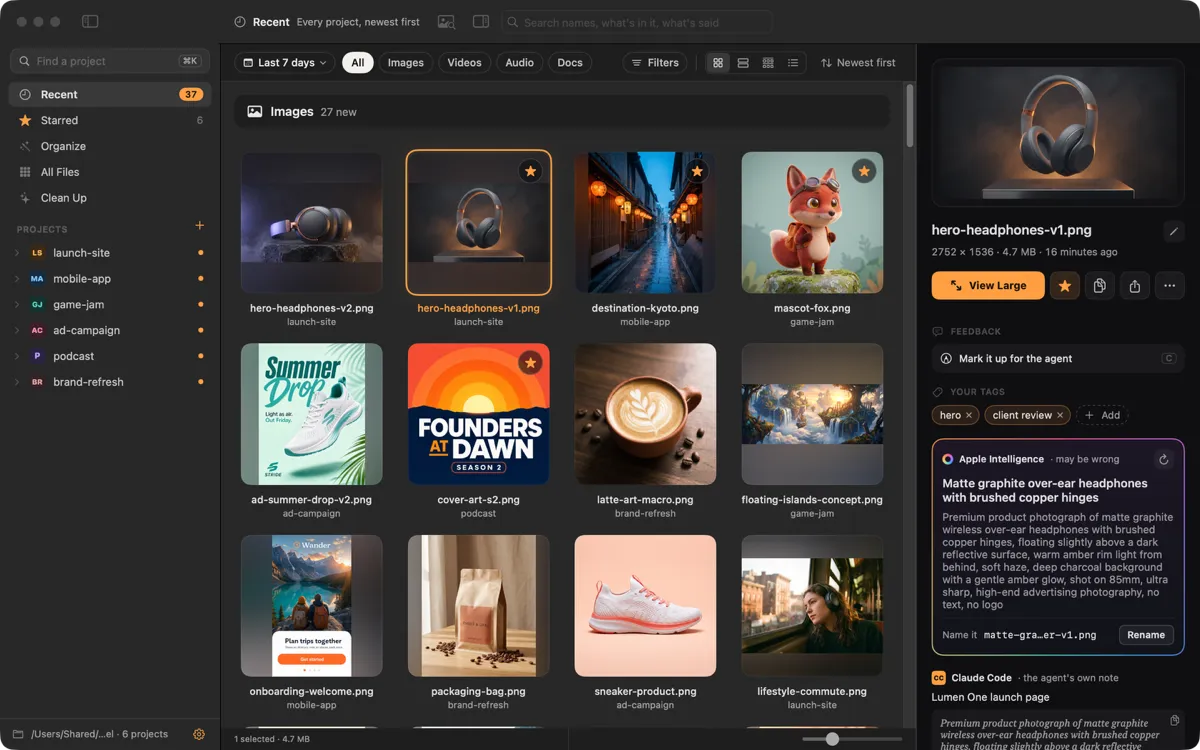
1 · Watch
Play anything the moment it lands.
Pictures, videos, voiceovers and documents open instantly. No hunting, no waiting.
Press Space to play
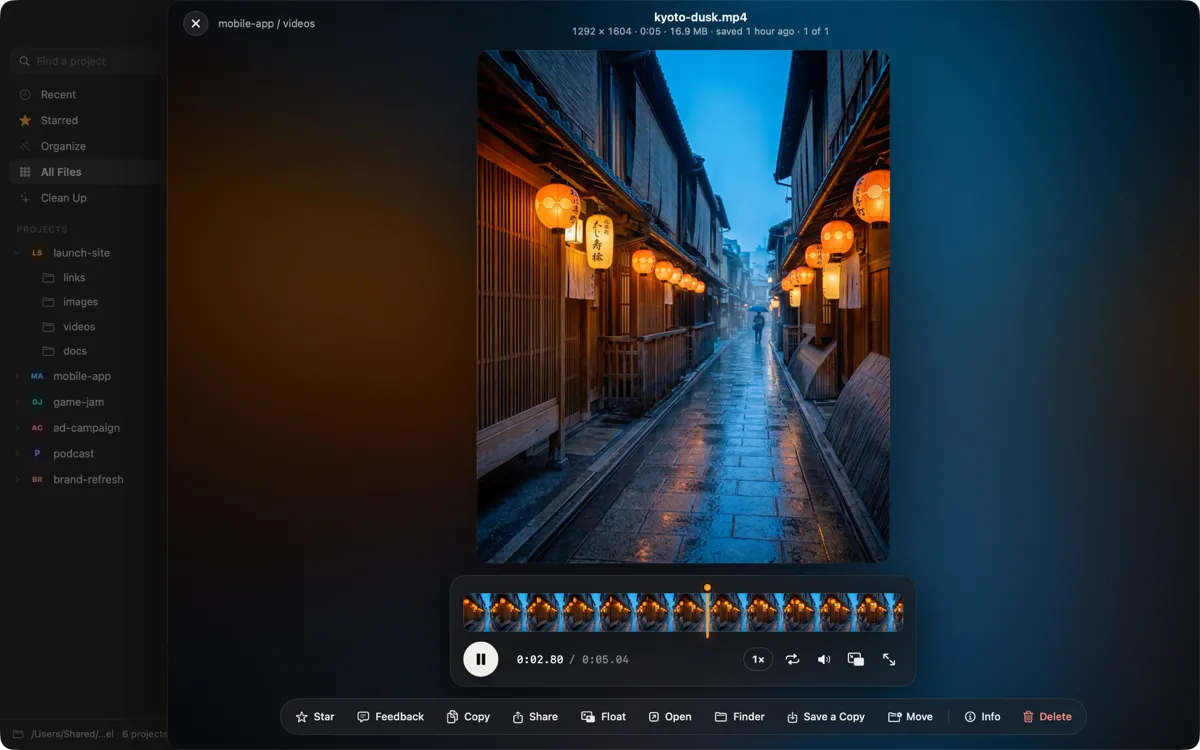
Videos fill the window, and the room behind them glows in the video’s own colors. The controls fade away while you watch.
Everything from the menu bar
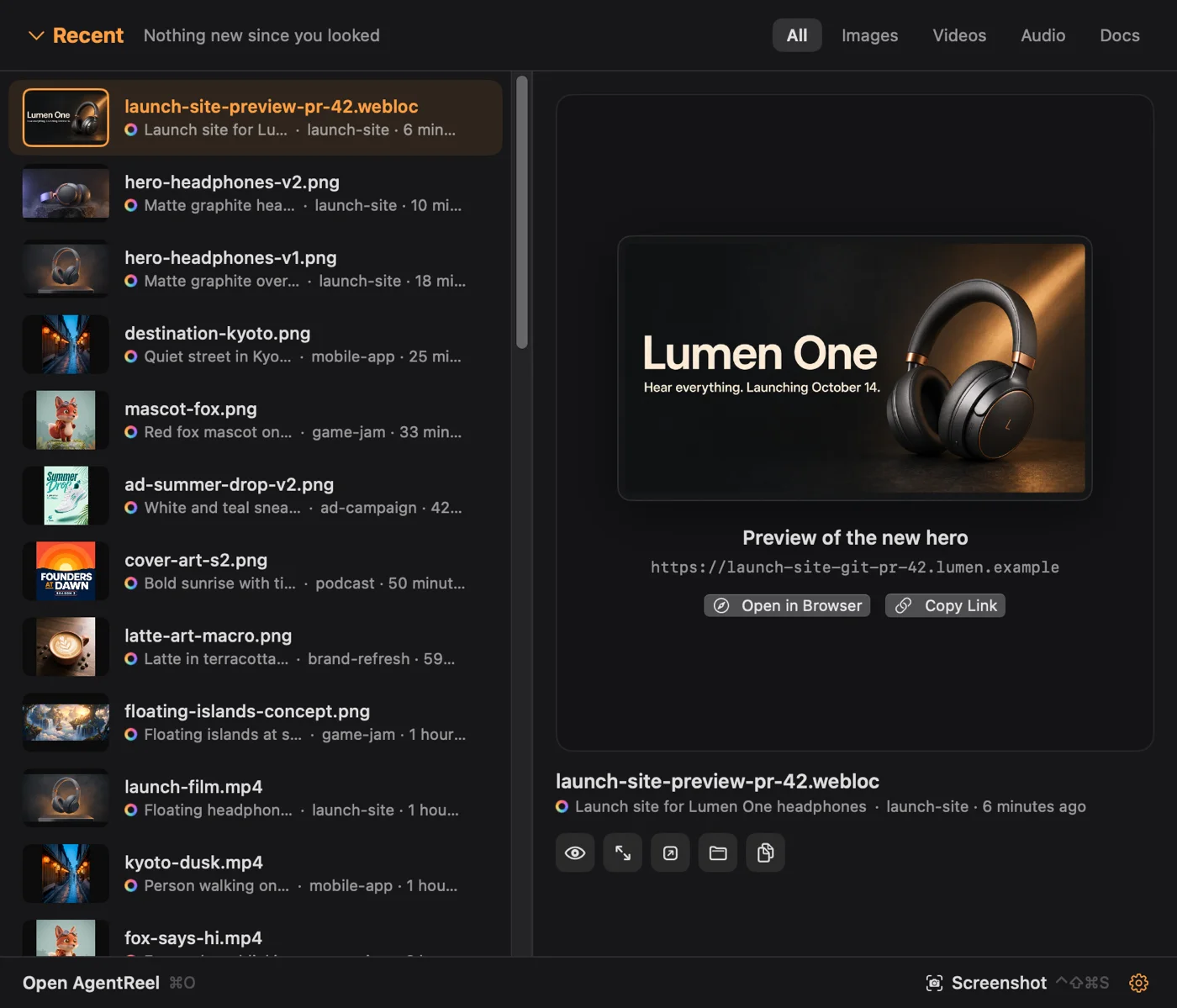
Your newest files live at the top of your screen, with the latest one already playing. Pick one project or see them all.
Find the exact moment
A filmstrip under every video shows a preview of each frame as you slide along it. J K L to play, comma and period for single frames.
Zoom to real pixels
Press Z for 100%, pinch or ⌘-scroll for more, and drag to look around. 0 fits it again.
Animated pictures move
GIF, APNG and animated WebP play in place, with a badge on the tile so you can spot them.
Keyboard friendly
Arrow keys for the next file, S to star, C for feedback, F for full screen.
Your default player
Double-click any picture, video or sound in Finder and it opens right in the menu bar. One click makes it full screen.
Skim without opening
Move your mouse across a video to flip through it. Try it on this one.

Float on top
Keep a reference picture, or a silent looping video, above every other window while you work. Fade it with its own opacity slider.
Documents read well too
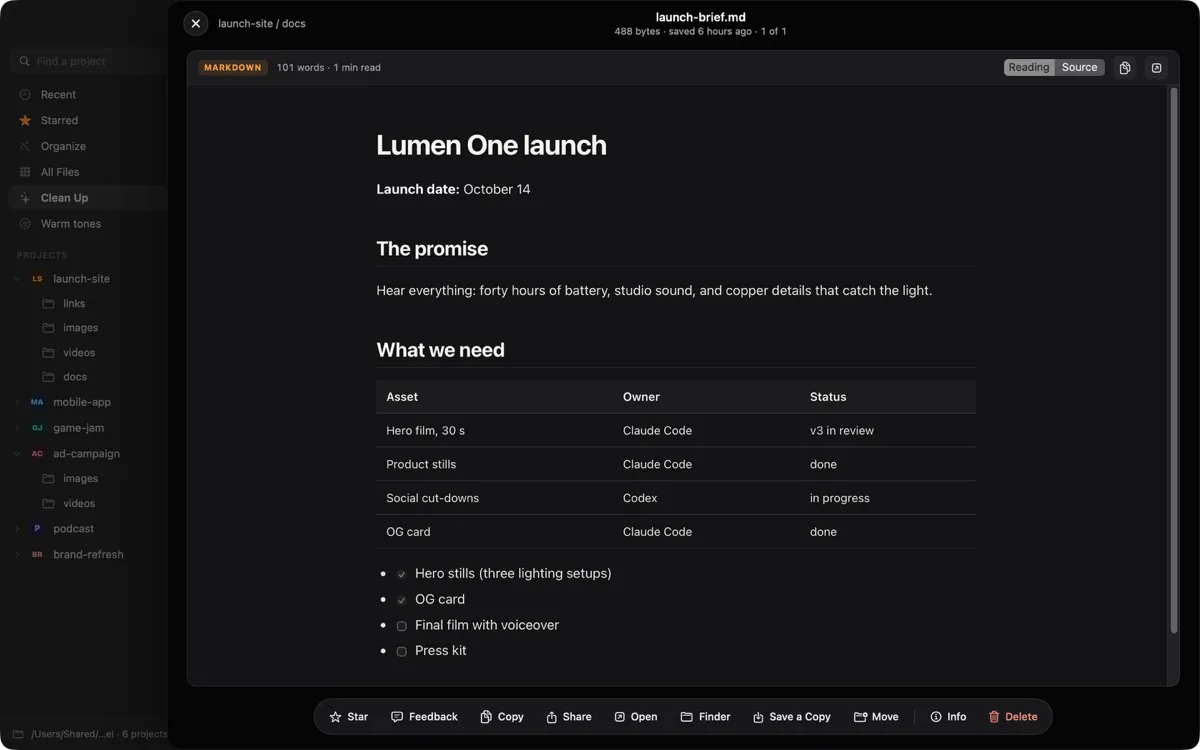
Markdown, text, tables, subtitles, JSON and Word files open in a calm reading view.
2 · Feedback
Point at what’s wrong. Your agent reads it.
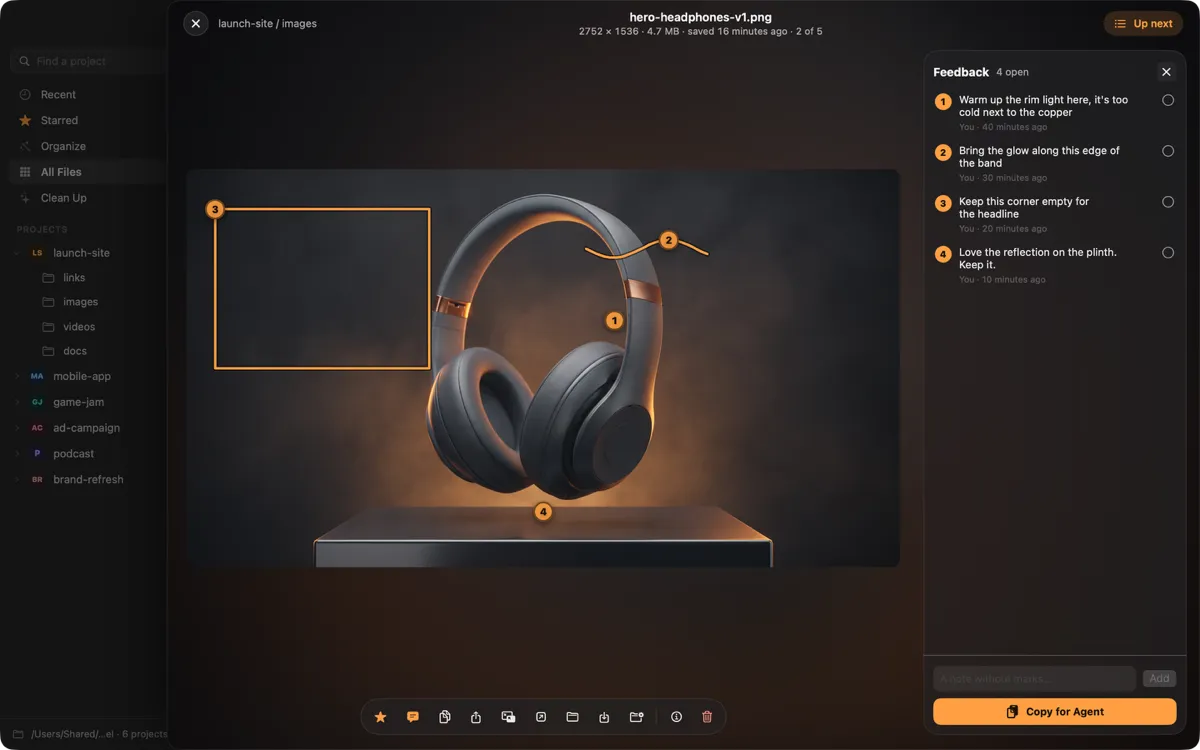
Typing “make the light on the left side warmer, no, the other left” is over. Mark the picture, and your agent gets your notes and the exact spots you meant.
- 1
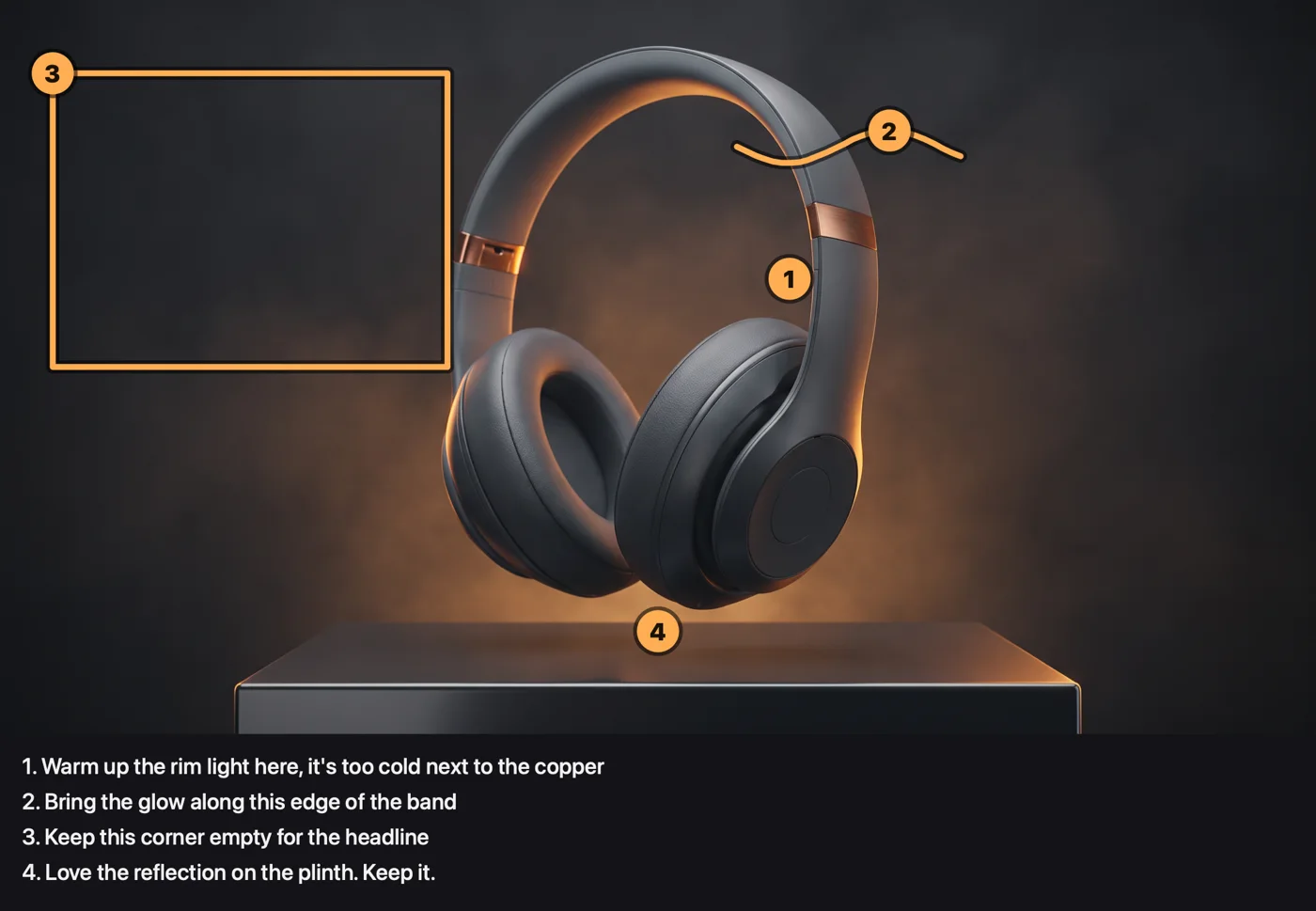
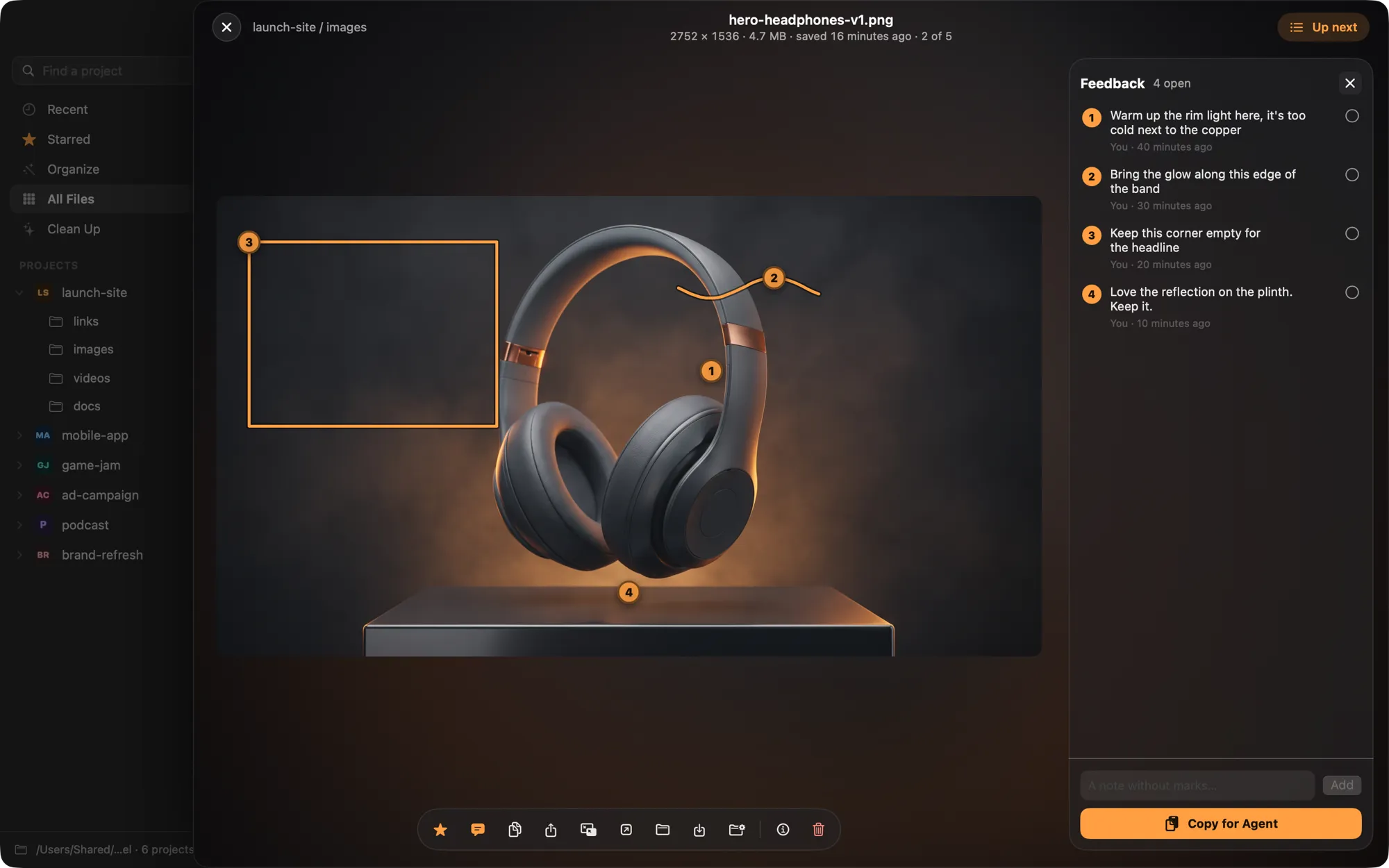
Mark up a picture
Press C in the player. Drop a pin, draw on it, or box an area, and say what you want changed. It’s saved on the file itself.
- 2
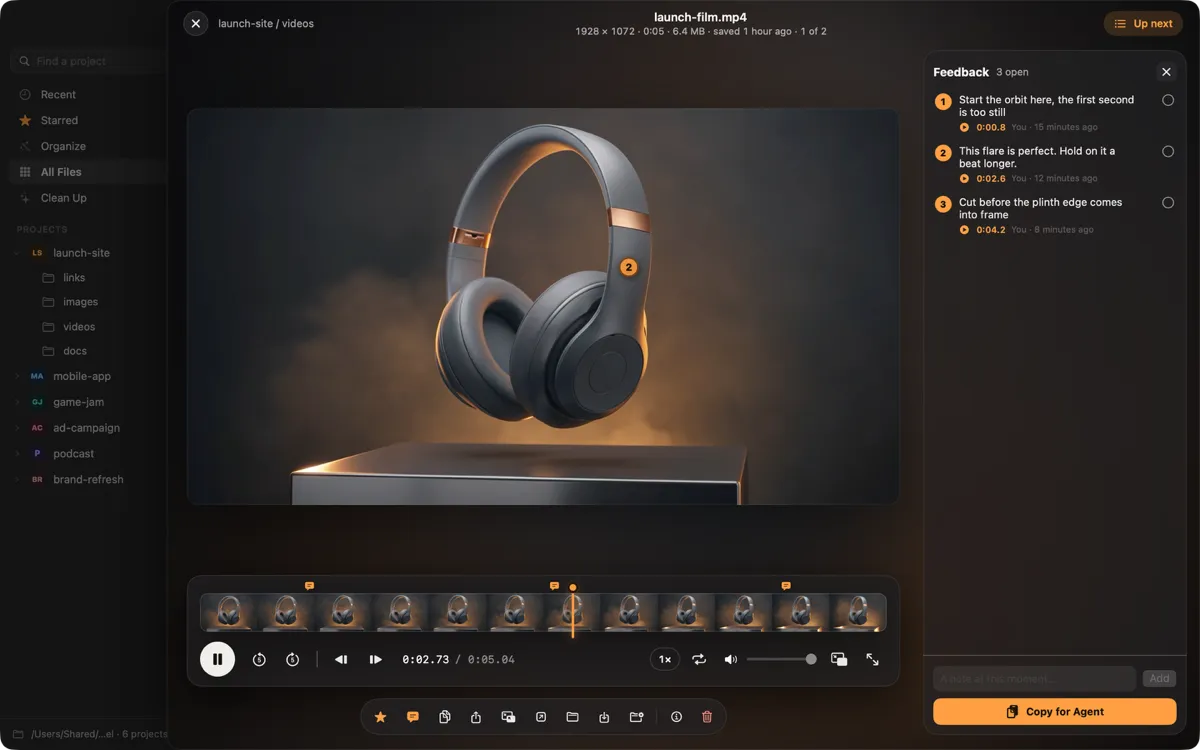
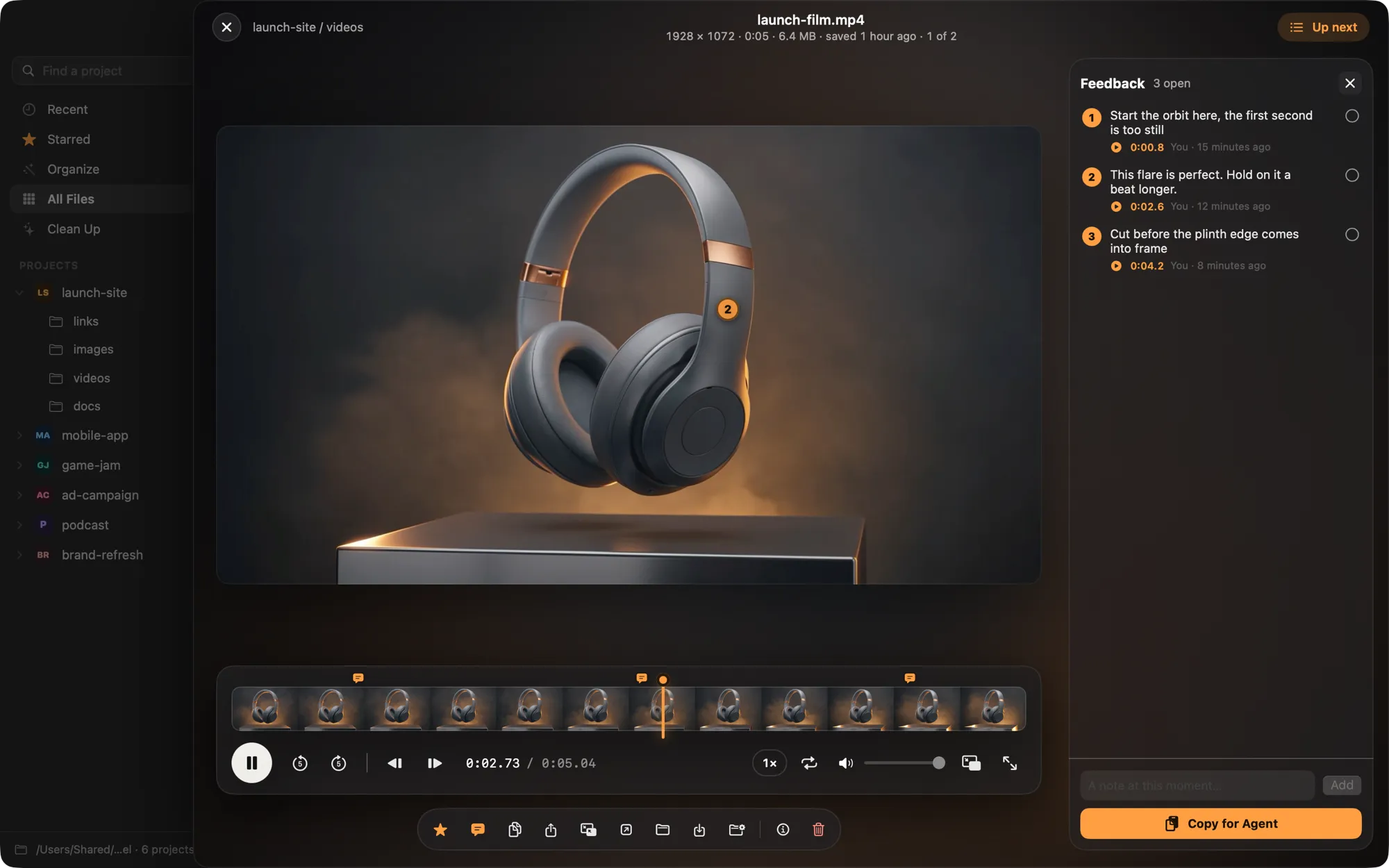
Pin a note to a moment
On a video, each note sticks to the second you wrote it, and shows as a flag on the timeline. Click a note to jump there.
- 3
Your agent sees your marks
Say “check my feedback”, or press Copy for Agent to put the notes and commands on your clipboard.
The agent runs one command and gets your notes plus a copy of the picture with every mark drawn on it, numbered to match.
- 4
Fixed means resolved
When the agent has made the change, it marks the notes done. Open feedback shows as a badge on the tile, so nothing gets lost between versions.
Then compare the new version with the old one.
agentreel feedback hero-headphones-v1.png --resolve fpin1,fstrkMarked 2 done on hero-headphones-v1.png.

3 · Compare
Two versions, one glance.
Select two files and press C, or click Compare with the previous version. Try it here: these are two real renders from the same prompt.


Four ways to look
Side by side, a swipe divider, an overlay you can fade, or a difference view that lights up only what changed.
Zoom stays linked
Zoom into one version and the other follows to the same spot. Videos play in sync.
Pick the winner
Star the one you’re keeping right there. AgentReel knows which file is the previous version and offers the comparison in one click.
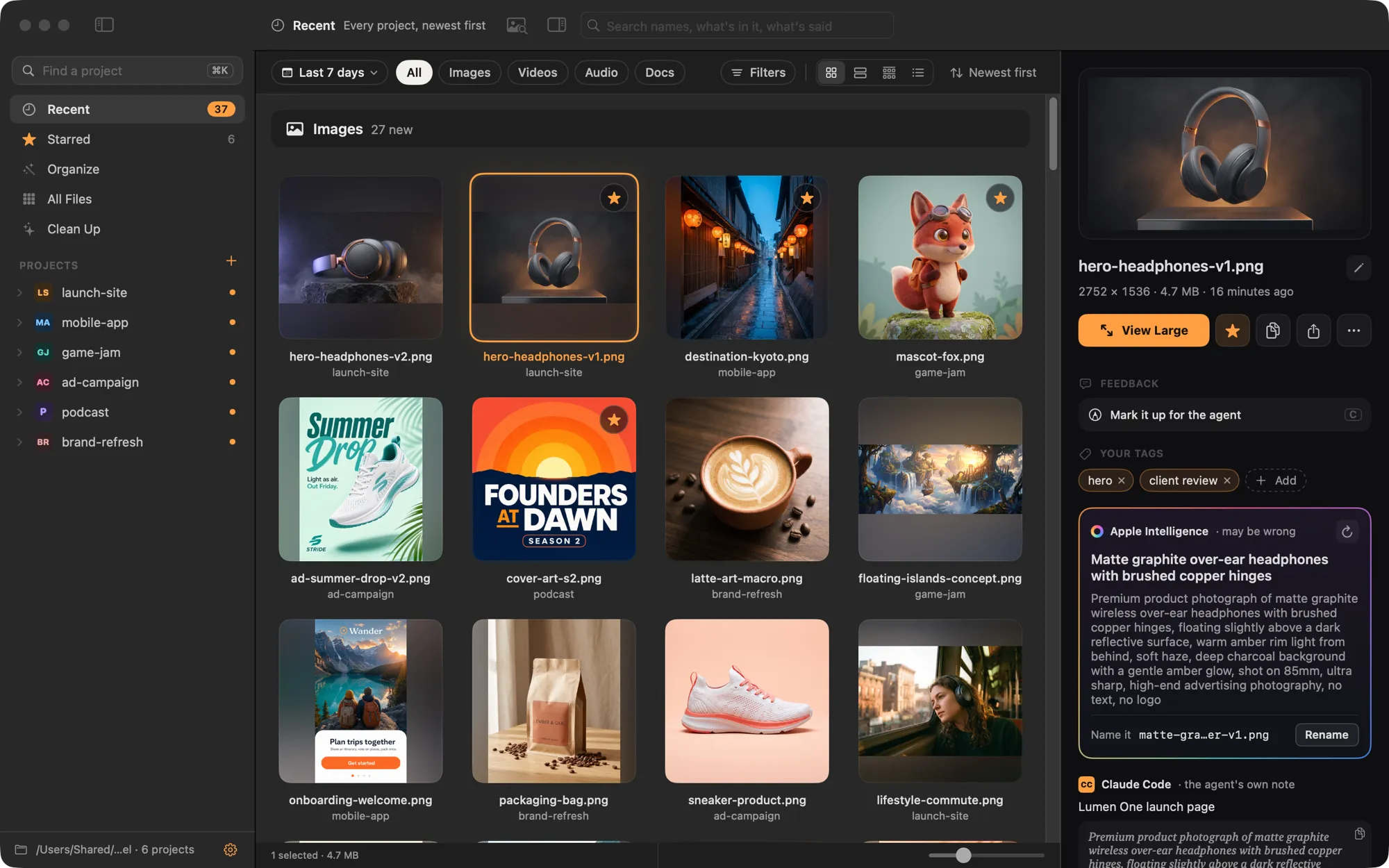
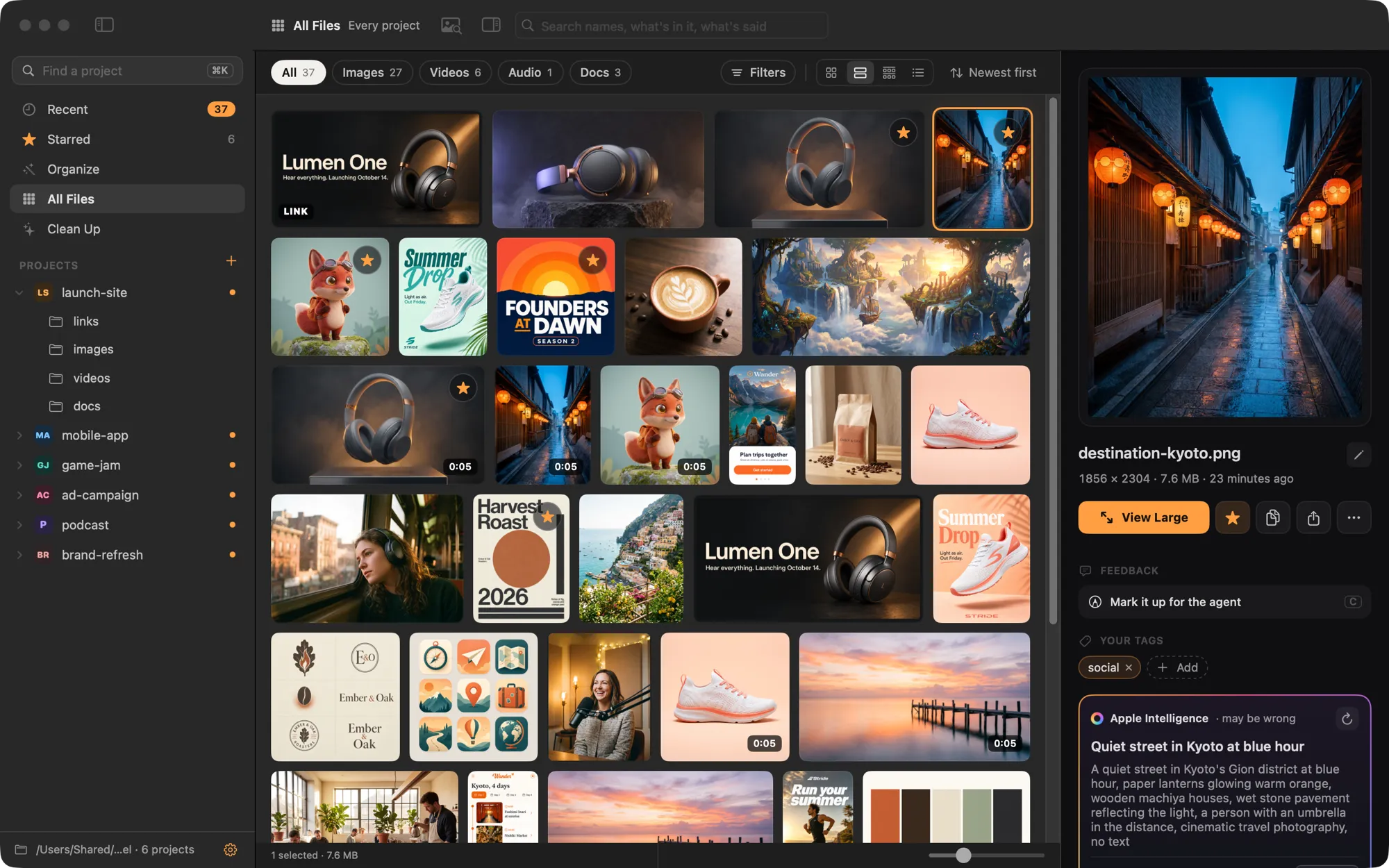
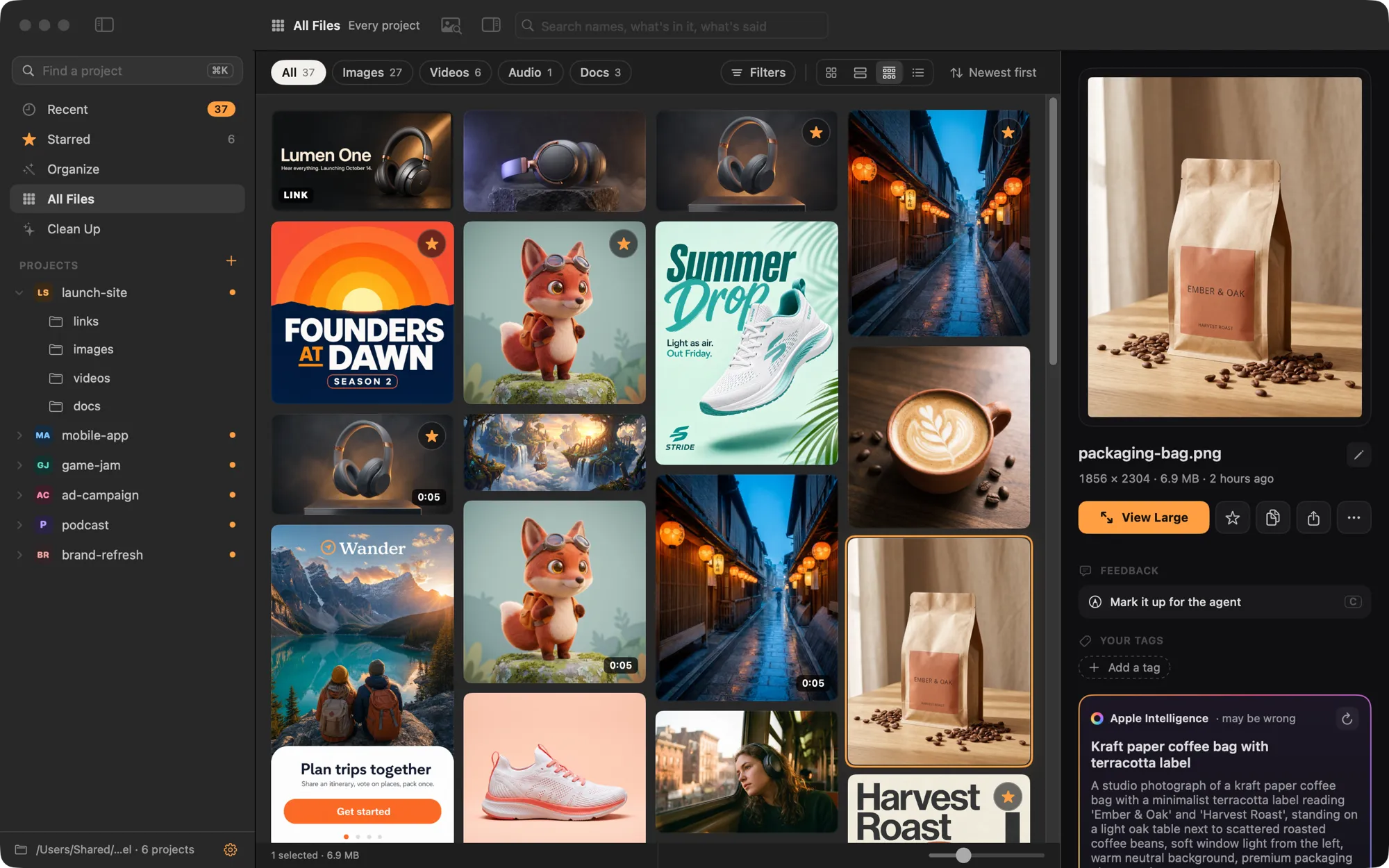
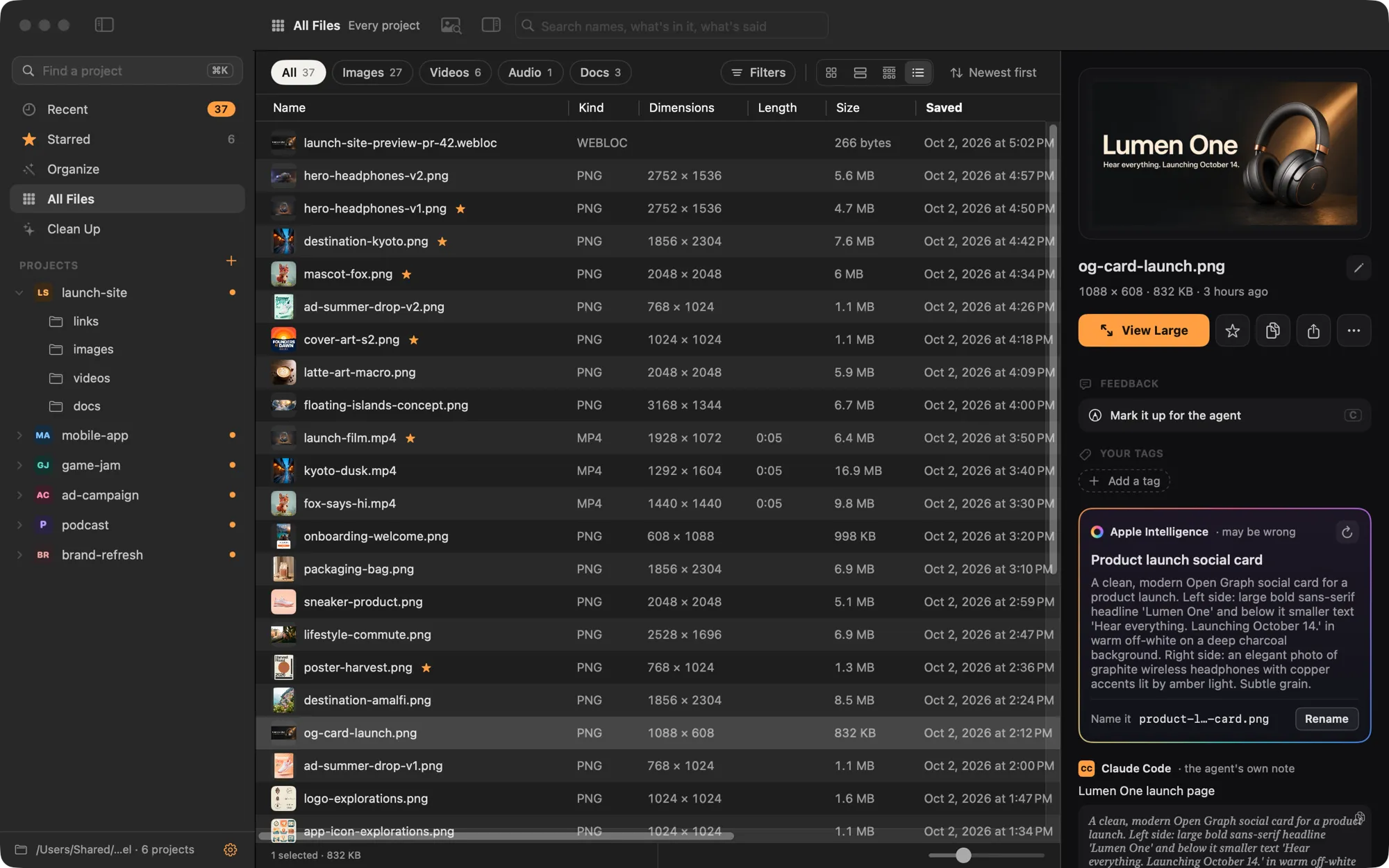
4 · Layouts
See your work the way it’s shaped.
Tall phone screens, wide banners and square icons shouldn’t all be squeezed into the same box. Pick the layout that fits.
5 · Find
Find it, even if you forgot the name.
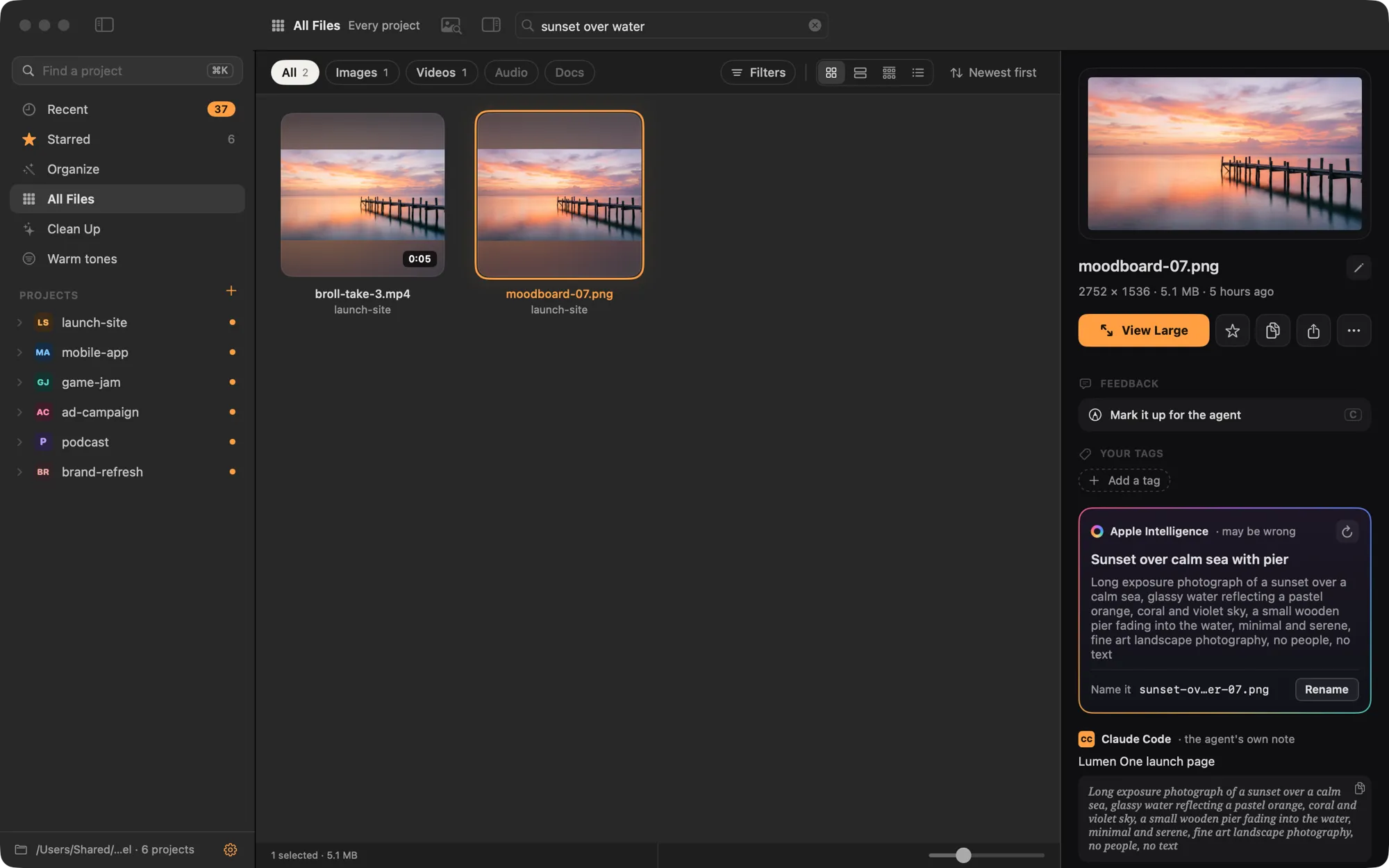
Search looks inside your files: the words in a picture, what’s said in a video, and what each one shows.
Search by what you see
Type “sunset over water” and it finds moodboard-07.png and broll-take-3.mp4. Neither name helps, and it doesn’t need to. Runs on your Mac with a free optional add-on.
Search inside files
Finds words in pictures, what people say in videos, your tags, and what an agent wrote about how it made the file.
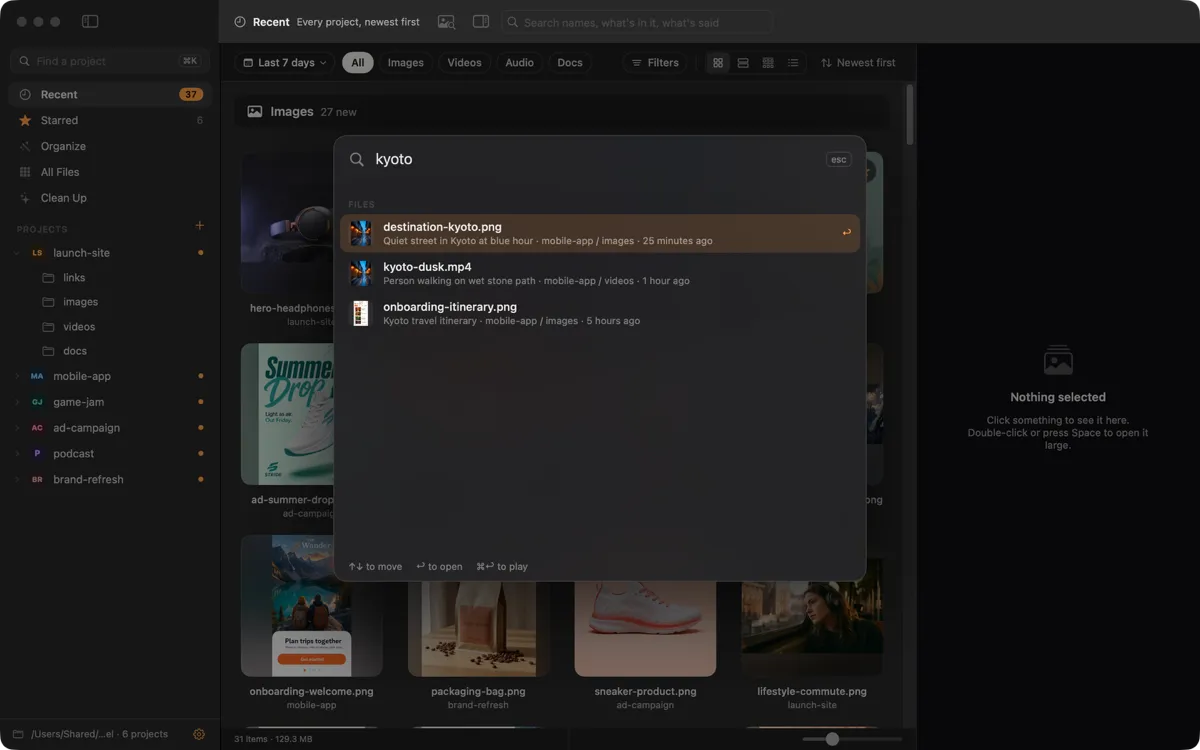
Jump anywhere with ⌘K
One shortcut to any project, folder or file.
Find Similar, or search with a picture
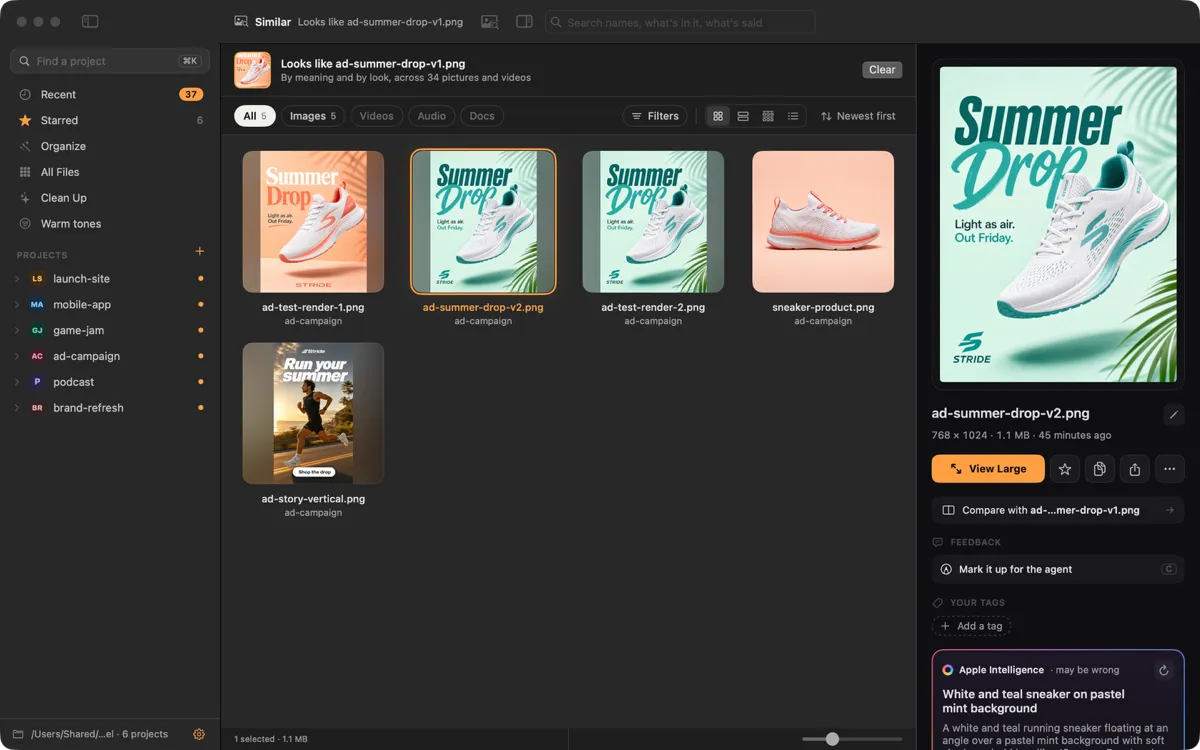
Right-click a file for everything that looks like it. Or drop, paste or choose any picture from anywhere and find its look-alikes in your library.
Filter by color
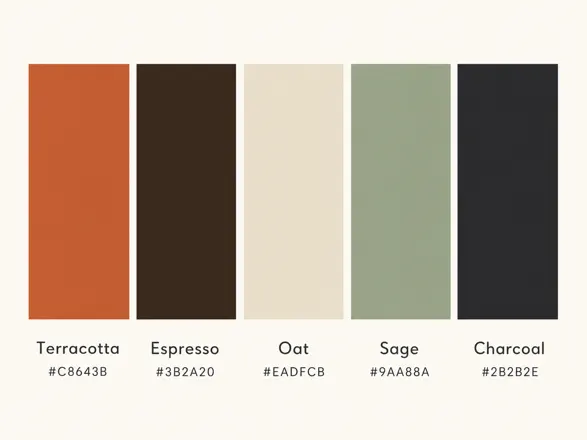
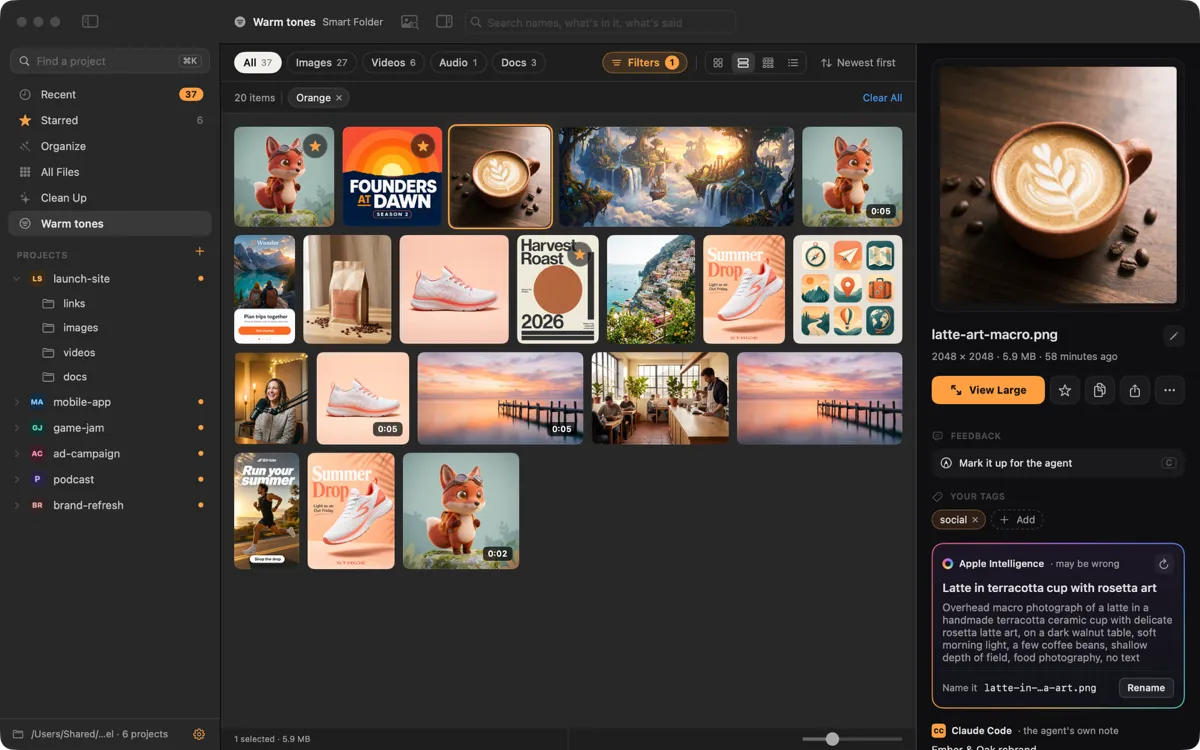
Every picture and video shows its main colors. Narrow any view to one, or click a swatch to copy its hex. Try it:
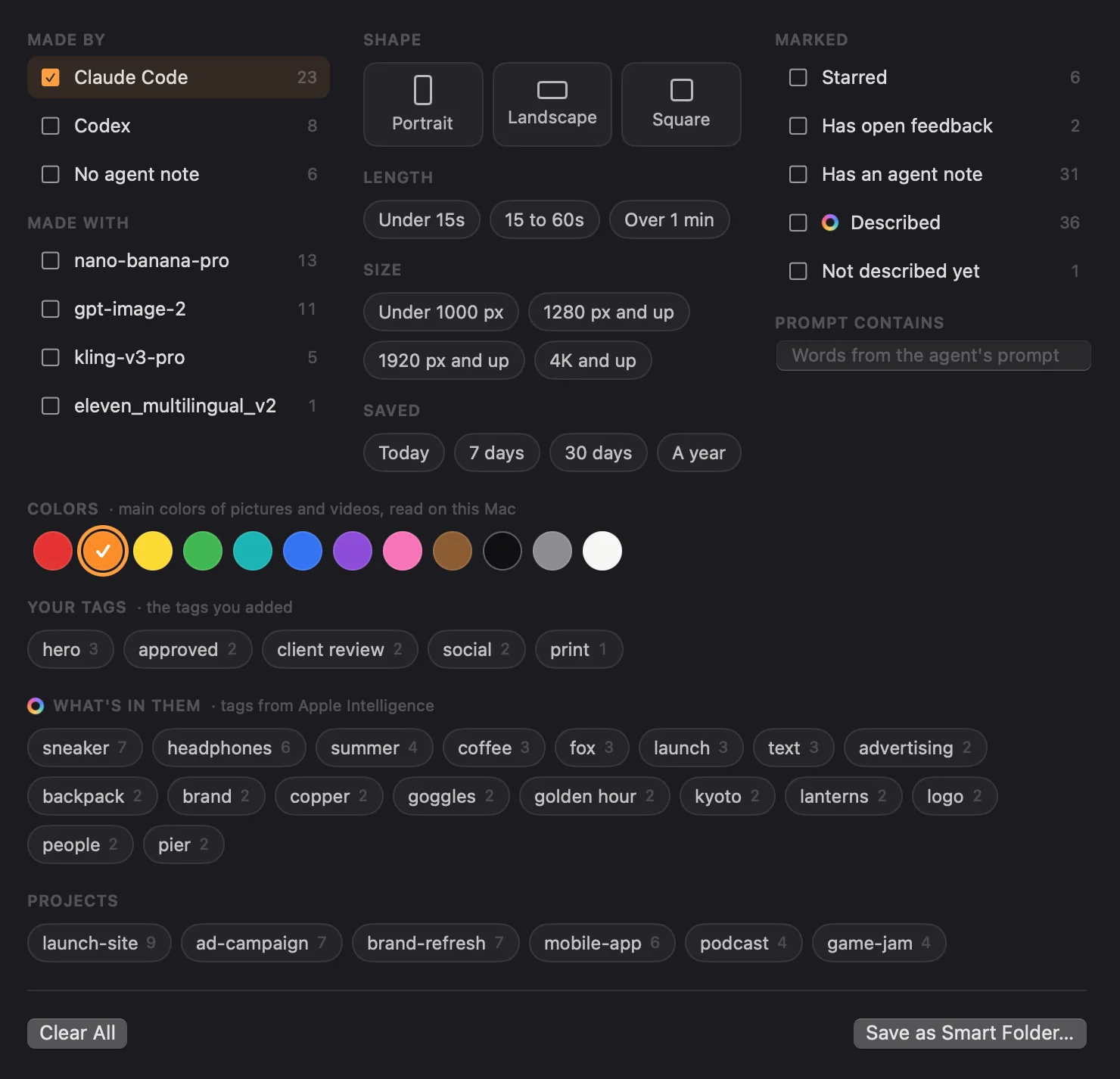
Filters and Smart Folders
Narrow any view by who made it, the model, shape, size, length, when it was saved, words in the prompt, colors, stars, notes, open feedback, tags or project. Save any set as a folder in the sidebar.
Your own tags
Tag one file or a whole selection. They’re real Finder tags, so Finder shows them too, and search and filters find them.
Recent, Starred, All Files
The newest files from every project, your favorites, or everything in one big grid.
Select and drag out
Draw a box to select many files, then drag them straight into Finder, Slack or anywhere.
6 · Understand
Know what every file is at a glance.
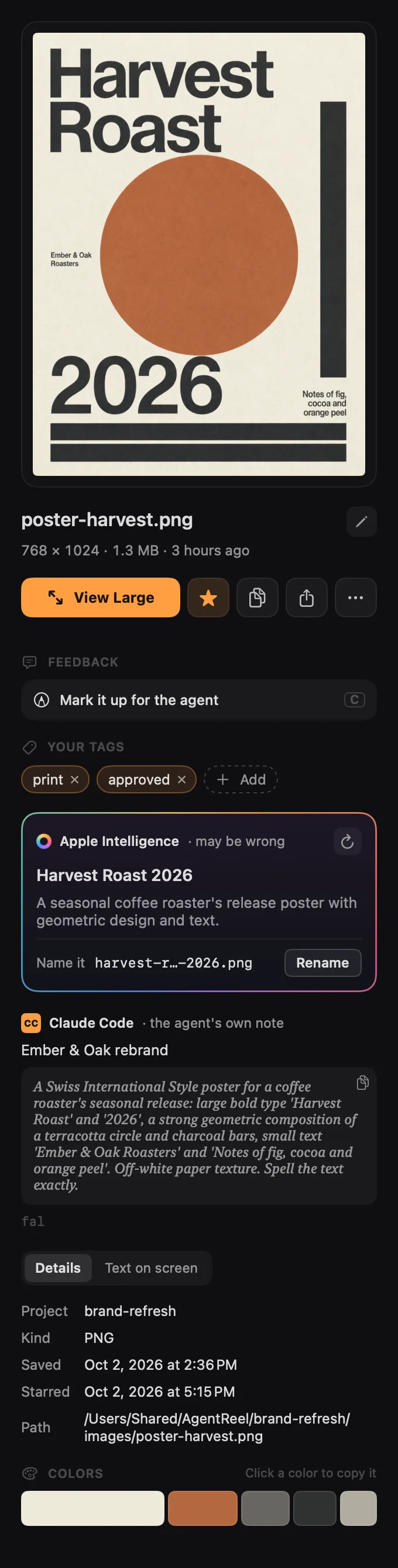
AgentReel looks at each file and tells you what’s in it, who made it, and how.
Automatic descriptions
Apple Intelligence writes a title, a one-line summary and tags. It sits in a rainbow ring, marked “may be wrong”.
Word-for-word text
Text in pictures and speech in videos are read off the file exactly, and marked that way.
How it was made
Agents leave a note on each file: the prompt, the AI model and the task. It follows the file when you move it.
Works without Apple Intelligence
A free optional add-on writes the descriptions instead, still on your Mac.
Better names in one click
Turn “sc08_final_v2.mp4” into a name that says what it is. Rename many files at once too. Versions and extensions stay.
7 · Finish
From render to ready, without leaving.
Three tools turn what an agent made into what you can ship. They always make a new file and never touch the original. The results below are real.
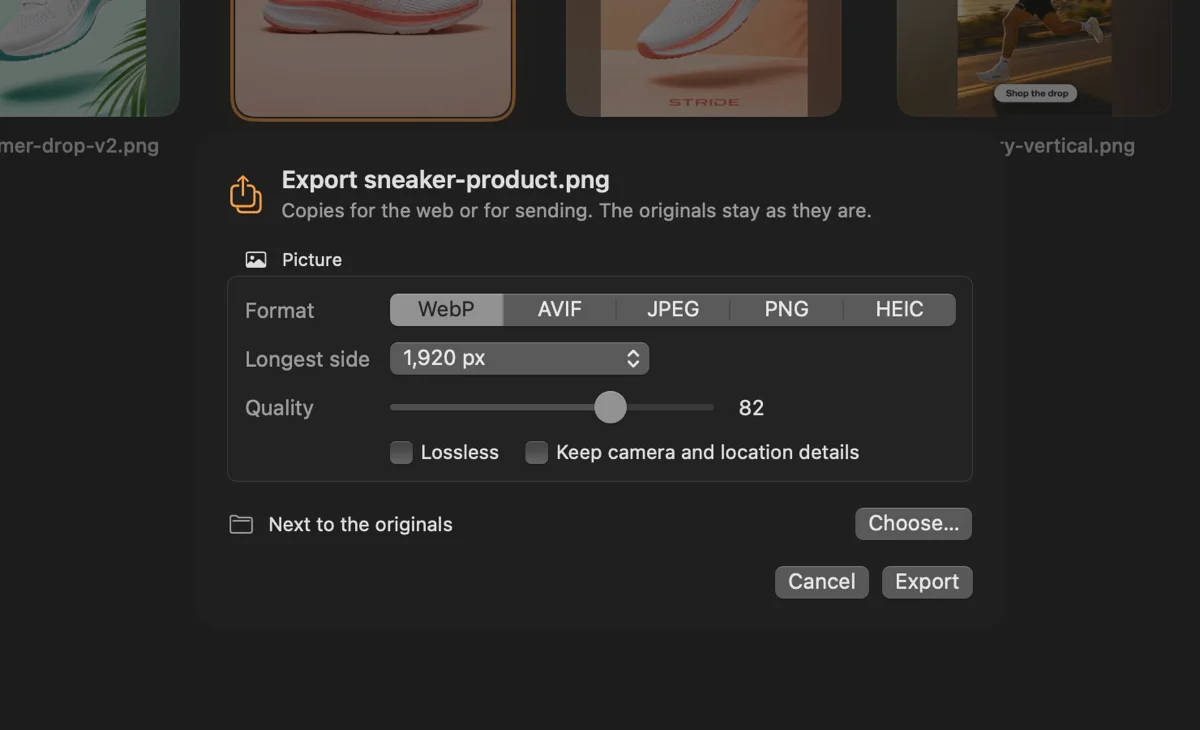
Export for the web
Pictures to WebP, AVIF, JPEG, PNG or HEIC at any size. Videos to MP4 or HEVC, trimmed or silent, plus GIFs, poster frames and sound. It tells you how much smaller each copy is.
A real example: the headphones render from earlier, exported 1,920 pixels wide. 99% smaller.


Remove the background
One click keeps the subject on transparency, ready for a page, a slide or an ad. Drag the divider.


Upscale 2× or 4×
Real-ESRGAN adds real detail, on your Mac, with a free optional add-on. This crop went from 512 pixels to 2,048.
Your agent can run all three too: agentreel export, cutout and upscale. The WebP pictures on this page were made that way.
8 · Organize
Messy folders? One click sorts them out.
Each project gets its own shelf. When things pile up, AgentReel tidies them for you, and you approve every move.
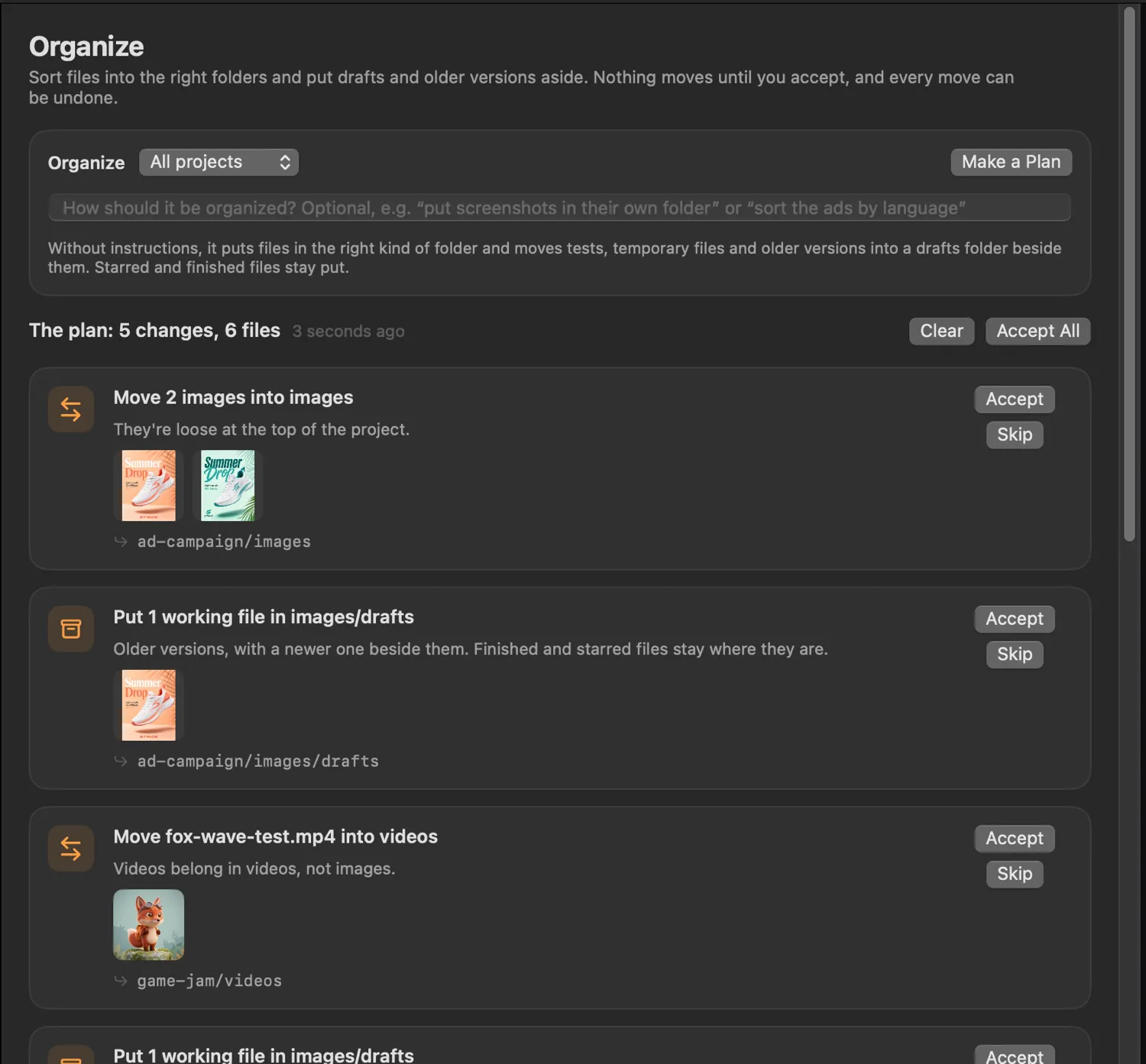
Organize everything
One button puts pictures, videos, audio and documents in the right folders, and sets tests and older versions aside in a drafts folder. See the whole plan first. Accept it all, pick and choose, or skip. One click undoes it.
Tell it how, in plain words
Type “put screenshots in their own folder” or “sort the ads by language” and it makes the folders and sorts the files.
Pick the projects you see
Tick the projects you care about and hide the rest. Hidden is never deleted.
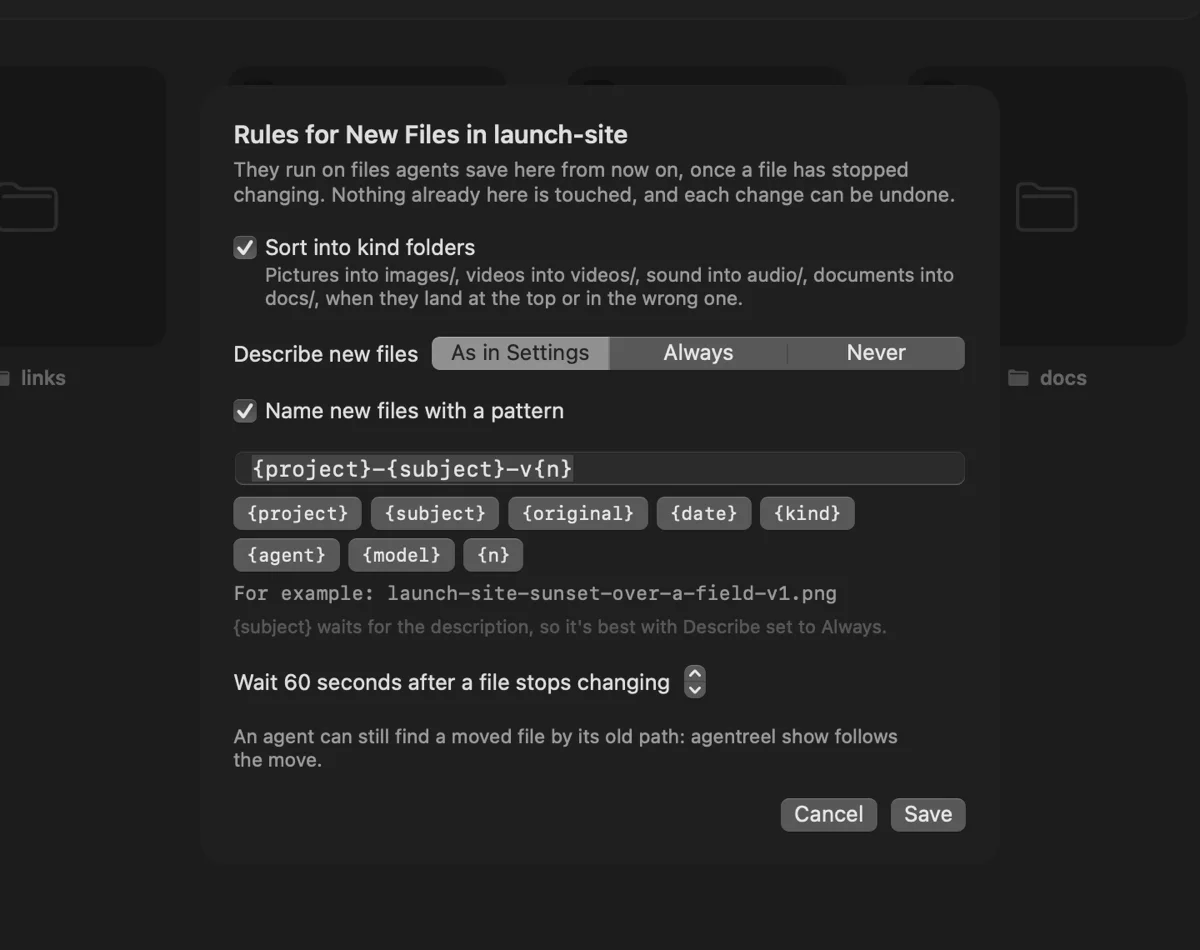
Rules for new files
Set it once per project: what agents save gets sorted into the right folder, described, and named from a pattern. Off until you turn it on, it waits until a file is finished, and every change has Undo.
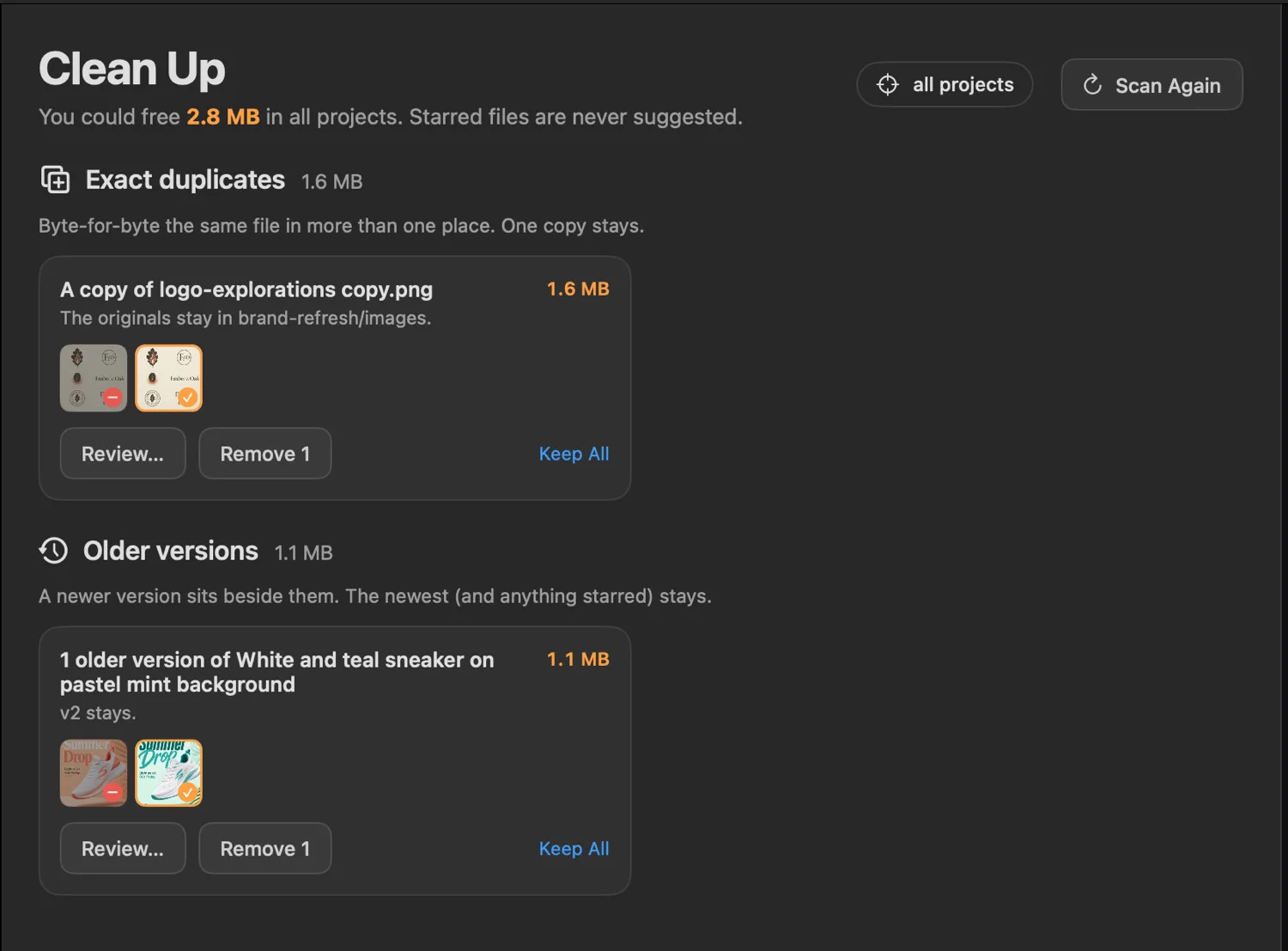
Clean Up, without the worry
Finds leftover frames, exact duplicates, older versions, near-identical shots and empty files. Review every suggestion first. Starred files are never suggested, and removed files go to the Trash.
One shelf per project
Files are grouped by the project they came from, with images, videos, audio and documents kept apart.
Pin, group, color
Arrange the sidebar your way. Drag one project onto another to group them.
Stars that stick
Star a file and it stays starred, even if you rename it or move it in Finder.
Hide file types
Code files and logs stay out of the way. Pick which types to hide in Settings.
9 · Capture
Get things in. Keep them close.
Not everything comes from an agent. Screenshots, copied pictures and links belong with the work too.
A screenshot shortcut that files itself
From anywhere on your Mac, drag a region. It lands in the project’s screenshots folder, and its picture and path are both copied, ready to paste to your agent.
Paste with ⌘V
Copied files, or a picture you copied from anywhere, drop straight into the folder you’re looking at.
iCloud friendly
Files still in iCloud show a cloud and download when you open them. AgentReel never pulls them down just to describe or index them.

Links live beside the work
Your agent can keep a deploy preview or a pull request next to the renders, with a picture of the page. Open it in the browser or copy the link.
A heads-up when files arrive
Get a notification when an agent saves something new.
Opens at login
Have it ready every time you turn on your Mac. Optional.
Updates itself
New versions arrive on their own, and it always asks before installing.
Works with your agents
If it can run a command, it can use AgentReel.
AgentReel sets itself up for Claude Code and Codex. For any other agent, it gives you a short paragraph to paste in. Here’s what your agent does behind the scenes, so you don’t have to.
The output on the right is real, from the library in the screenshots. Read the agent skill.
Private by default
Everything happens on your Mac.
Reading text in pictures, describing files, searching by what you see, comparing, upscaling and organizing all run on your Mac. Nothing is uploaded, ever.
- Your code stays clean. Nothing gets added to your project’s files.
- Plain folders. Everything lives in a normal folder you can open in Finder.
- Nothing to lose. Stars, tags, notes and feedback are stored on the files themselves. Delete the app and reinstall it later, and they’re still there.
- No junk. Build folders like node_modules are skipped automatically.
Search by what you see
Find pictures and videos by describing them, even with no description or text in them.
Descriptions without Apple Intelligence
Writes titles, descriptions and tags, and follows your organizing instructions, on Macs where Apple Intelligence isn’t available.
Upscale pictures
Makes a picture two or four times bigger with real detail, using Real-ESRGAN.
Add-ons download once from Settings, then work offline. Remove them any time.
The full list
Everything it does, A to Z.
- Agent notesSee the prompt, model and task an agent used to make a file.
- All FilesEvery file from every project in one grid.
- Animated previewsGIF, APNG and animated WebP play in place, with a badge on the tile.
- Apple Intelligence descriptionsAutomatic titles, summaries and tags, marked as possibly wrong.
- Box selectDrag a box across files to select many at once.
- Clean UpFinds duplicates, leftovers and old versions for you to review.
- Color filterNarrow any view to files with a main color, like orange or teal.
- Color swatchesA file’s main colors in the details panel. Click one to copy its hex.
- Colors and groupsColor-code projects and group related ones together.
- CompareTwo versions side by side, swiped, overlaid or as a difference, with linked zoom.
- Copy for AgentYour feedback and the exact commands, ready to paste into a chat.
- Default playerDouble-click media in Finder and it opens in AgentReel.
- Delete NowSkip the Trash when you’re sure.
- Descriptions without Apple IntelligenceAn optional add-on that describes files on any Apple silicon Mac.
- Drafts folderTests, temporary files and older versions, set aside by Organize.
- Drag to FinderDrag a selection out to Finder or any app.
- Export for the webWebP, AVIF, JPEG, PNG, HEIC, MP4, HEVC, GIF, poster frames and M4A, at any size.
- Feedback marksPins, drawings and boxes on a picture, saved on the file for your agent.
- FilmstripPreview every frame of a video as you slide along it.
- FiltersNarrow by maker, model, shape, size, length, date, color, stars, notes, tags or project.
- Find SimilarEverything that looks like a file, by meaning and by look.
- Float on TopKeep a picture or a looping video above every window, with its own opacity.
- Full-window playerVideos fill the window and light it with their own colors.
- Hidden file typesKeep code files and logs out of view.
- Hide projectsKeep a project out of the way without deleting anything.
- Hover to skimMove the mouse across a video to flip through it.
- iCloud friendlyFiles still in iCloud show a cloud and download when you open them.
- Jump anywherePress ⌘K to go to any project, folder or file.
- Keyboard shortcutsSpace, J K L, arrows, S to star, C for feedback, F for full screen.
- LayoutsSquares, rows, columns or a sortable list.
- LinksDeploy previews and pull requests saved beside the work, with a picture of the page.
- Look-alikesSpots near-identical shots so you can keep the best one.
- Menu bar playerFiles opened from Finder play right in the menu bar.
- Menu bar project filterShow one project’s newest files, or all of them.
- NotificationsKnow the moment an agent saves something.
- Open at loginReady whenever your Mac is.
- OrganizeSorts a project, or everything, into the right folders, with undo.
- Paste⌘V drops copied files or a copied picture into the open folder.
- Pick your projectsChoose which projects you see the first time you open the app.
- PinsKeep favorite projects and folders at the top of the sidebar.
- Plain-words organizingSay how you want things sorted, and it makes the folders.
- Quick LookPeek at any file without opening it.
- RecentThe newest files from every project, in one place.
- Remove BackgroundOne click keeps the subject on transparency.
- Rename suggestionsClear names based on what’s in the file.
- Rules for new filesSort, describe and rename what agents save, per project, with undo.
- Share linksagentreel share puts a file on your own server and hands back a link that opens on a phone.
- Screenshot shortcut⌃⇧⌘S saves a screenshot into the project and copies its path.
- Search by pictureDrop or paste any picture to find what looks like it.
- Search by what you seeFind pictures and videos by describing them. Optional add-on.
- Search inside filesFinds words in pictures and what’s said in videos.
- Smart FoldersSave a filter as a folder.
- StarsMark favorites. Stars follow the file everywhere.
- TagsYour own tags, stored as Finder tags and searchable everywhere.
- TidyNotices misplaced new files on its own and suggests where they go.
- Timed video notesComments pinned to a moment in a video, flagged on the timeline.
- UndoEvery move Organize, Tidy or a rule makes can be undone in one click.
- UpdatesArrive on their own, and always ask first.
- UpscaleMake a picture two or four times bigger, on your Mac. Optional add-on.
- Word-for-word textText and speech read straight off the file.
- ZoomReal pixels with Z, more with a pinch, drag to look around.
Questions
Is it really free?
Yes. AgentReel is free to download and open source. The optional add-ons are free too.
What’s an “agent”?
An AI helper that does work for you, like Claude Code or Codex. Besides writing code, agents make pictures, videos, voiceovers and documents. AgentReel is where those end up.
How does my agent see my feedback?
It runs agentreel feedback. That prints your notes, and it can ask for a copy of the picture with your pins, drawings and boxes drawn on it, numbered to match. When it has made the change, it marks the notes done.
Will it change anything in my code?
No. Your agent’s files go to a separate folder outside your project, and nothing is added to your code.
Will Organize move things without asking?
Never. It shows you a plan first. Nothing moves until you accept, and one click undoes it.
What about rules for new files?
Rules are off until you turn them on for a project. They only touch files that arrive afterwards, they wait until a file has stopped changing, and every change has an Undo. An agent can still find a moved file by its old path.
Do Export, Remove Background and Upscale change my originals?
No. Each one makes a new file beside the original and leaves the original alone.
Does anything get uploaded?
No. Your files stay on your Mac, and descriptions, search, comparing and organizing all run on your Mac. The add-ons download once, then work offline.
What Mac do I need?
A Mac with Apple silicon (M1 or newer) on macOS 15 or later. Automatic descriptions use Apple Intelligence on macOS 26 or later, or the free add-on if you don’t have it.
Which agents does it work with?
It sets itself up for Claude Code and Codex. For any other agent that can run a command, AgentReel gives you a short paragraph to paste in.
How big are the add-ons?
Search by what you see is about 600 MB. Descriptions without Apple Intelligence is about 1.8 GB. Upscale pictures is about 67 MB. All three are optional, and you can remove them any time in Settings.
Will it slow down my Mac?
It works in the background and pauses in Low Power Mode or when your Mac gets hot. You can turn automatic descriptions off any time.
What if I delete the app?
Nothing is lost. Your files, stars, tags, feedback and settings live outside the app, so reinstalling picks up right where you left off.

Stop hunting. Start watching.
Give everything your agent makes a home, and see it the moment it’s ready.
Download AgentReel for MacFree · Open source · Apple silicon, macOS 15 or later